POS, inventory and payroll in one app for Philippine businesses.
Sell on the phone, tablet or laptop you already have, even when the internet drops. Count stock, clock in your staff and run payroll in the same app.
No card needed. After the trial, stay on Free or pay from ₱749 a month by GCash or Maya.

Look around the app
Real screens from a demo sari-sari store.
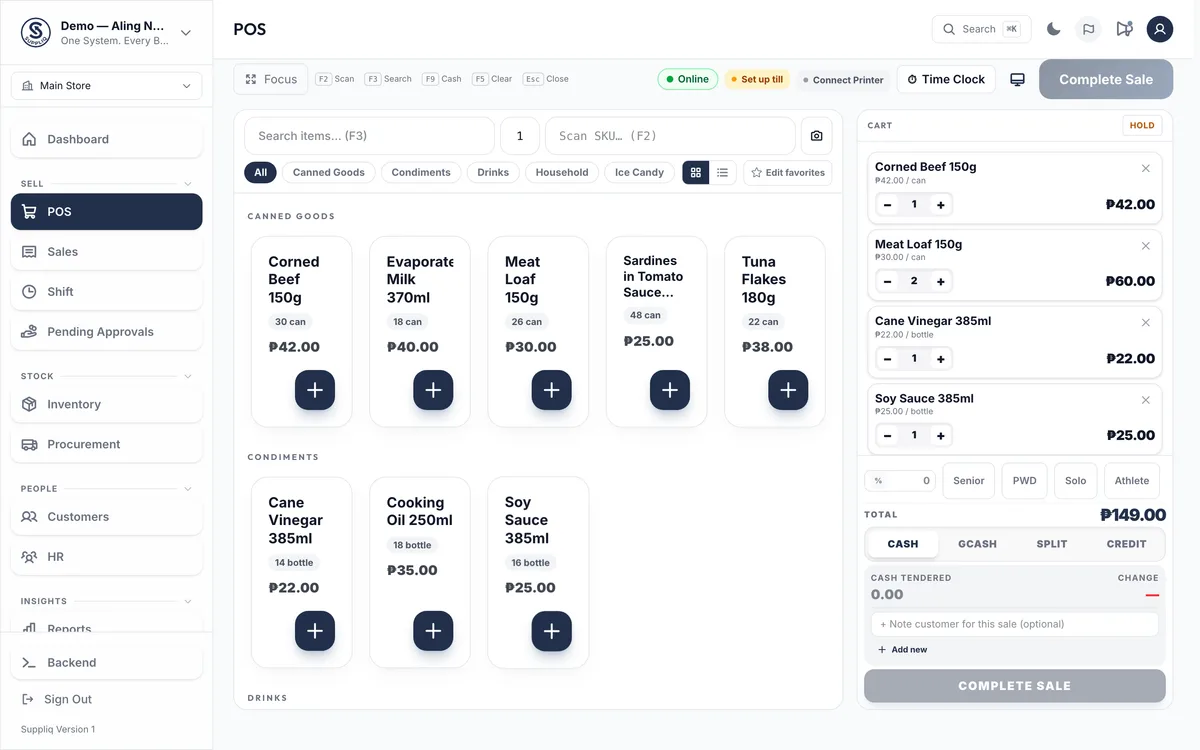
Tap items into the cart, then take cash, GCash, a split payment or customer credit. Senior and PWD discounts are one tap, and it keeps selling when the internet drops.

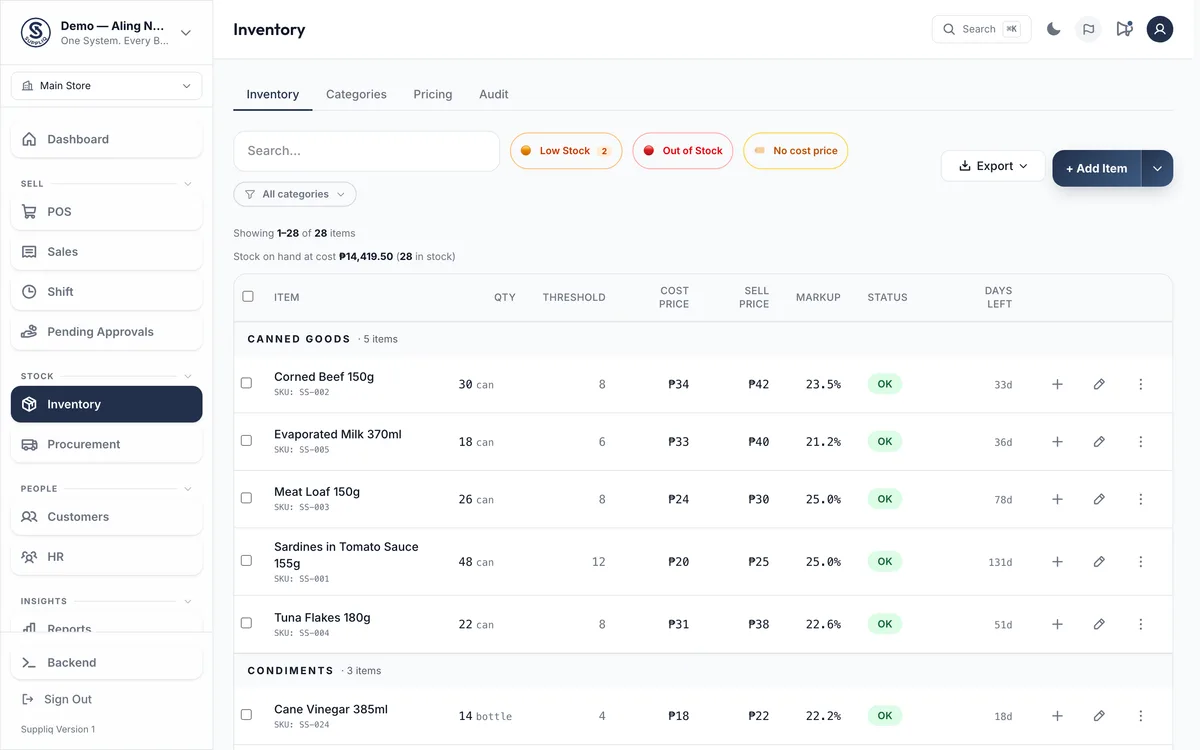
Every item with its stock, cost and markup, filtered to what is low or out of stock. Stock counts are on Starter and up.

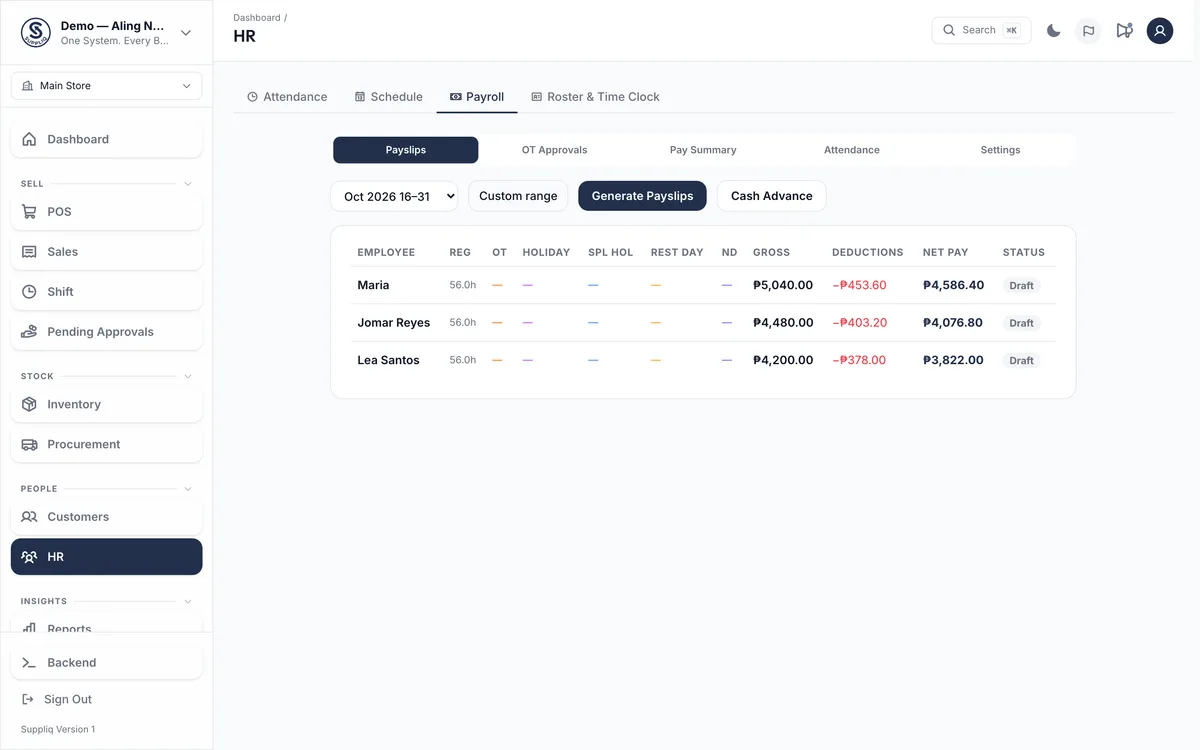
Payslips made from your staff’s hours, with SSS, PhilHealth and Pag-IBIG worked out. Payroll is on Growth and up; selfie clock-in is on Starter.
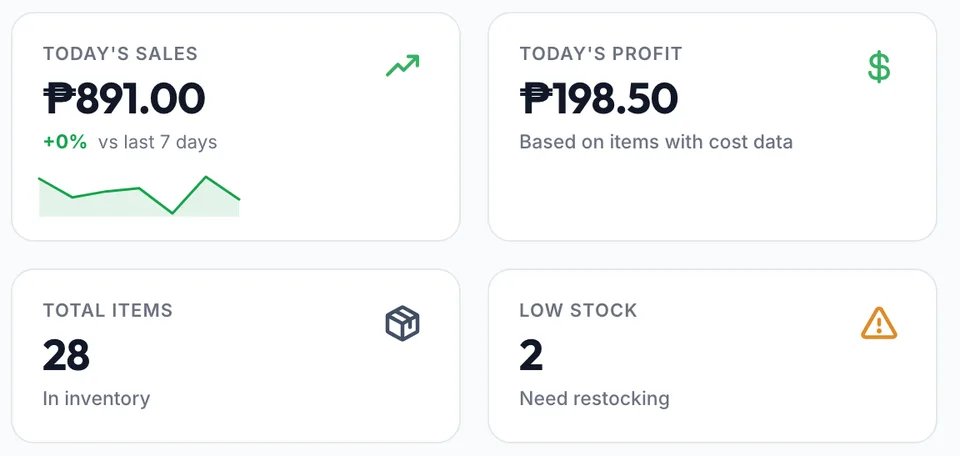
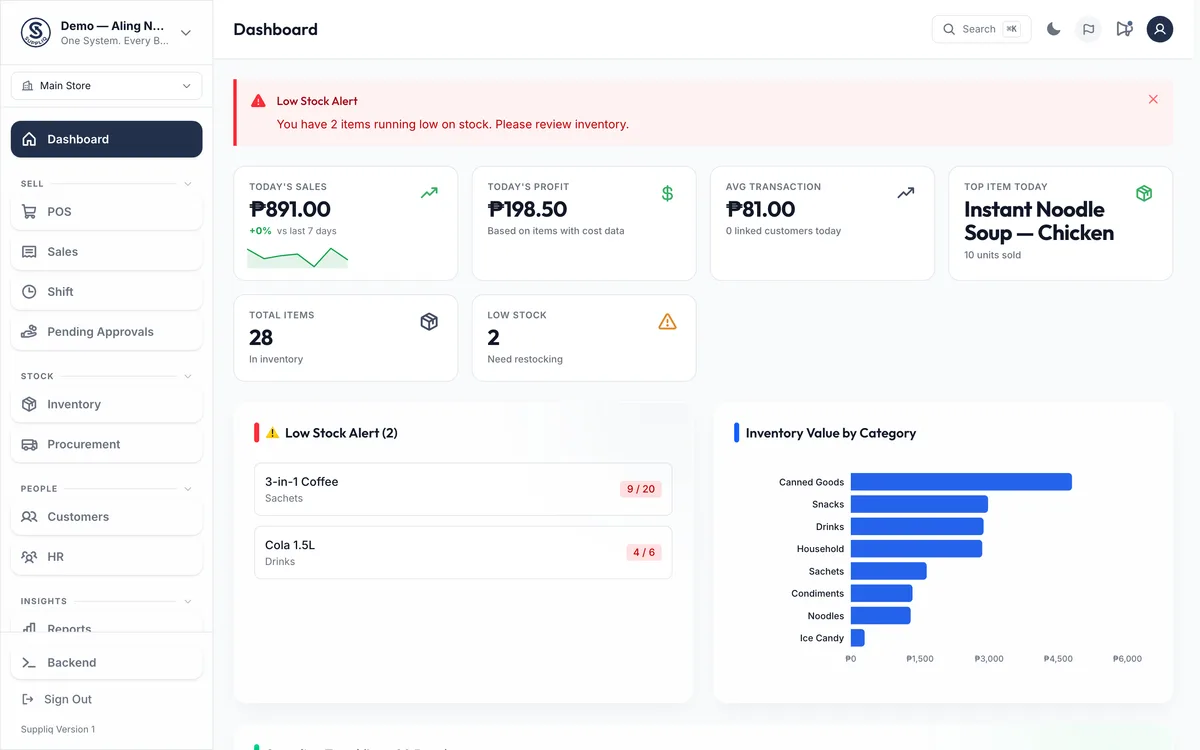
Today’s sales, profit and what is running low. Every shift closes with a cash count, and on Starter and up expenses are logged as they happen. After BIR setup, on Starter and up, Suppliq issues sequential sales invoices, X and Z readings and an electronic journal.

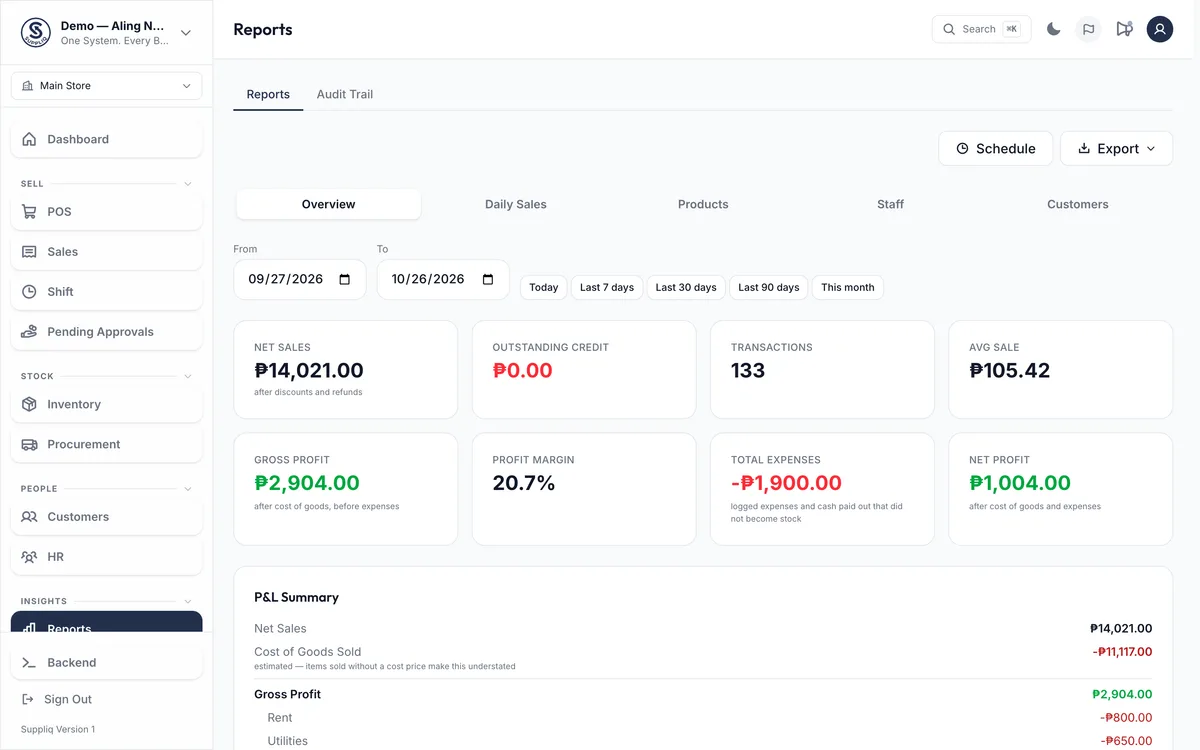
Net sales, profit and expenses for any dates, ready to export or email on a schedule, and AI insights on what to act on. Reports and AI insights are on Growth and up; the all-branch dashboard is on Scale.
From opening the store to paying your staff
A normal day at a sari-sari store running Suppliq.
-
Open and start selling
Count the cash in the drawer, then tap items into the cart. Take cash, GCash, a split payment or credit for a regular customer.
-
Restock before you run out
Stock goes down with every sale, and the list shows what is running low. When the supplier arrives, record the delivery and the new stock is counted in.
-
Check how the day is going
Open the dashboard from anywhere to see today’s sales, profit, your best seller and what is running low.
-
See what you really earned
Sales minus what the goods cost minus your expenses, for any dates you choose. Reports are on Growth and up.
-
Pay your staff on payday
Staff clock in with a selfie on Starter and up. On payday, payslips are made from their hours with government deductions worked out, on Growth and up.
What do you sell?
Pick your kind of business at sign-up and Suppliq turns on the tools for it.
- Sari-sari and retailBarcode scanning, customer credit and low-stock alerts on every plan.
- Food and drinksAdd-ons, kitchen tickets and recipe costing, on Growth and up.
- Salons and spasAppointments and staff commission from Starter, service packages on Growth.
- Laundry and servicesLaundry tickets on a Ready board and prices by the kilo, from Starter.
- Repair shopsJob orders on Growth; estimates on your letterhead and payments on Scale.
- WholesaleQuantity-break prices and sales orders that become sales, on Growth and up.
What each plan adds
| Feature | Free | Starter | Growth | Scale |
|---|---|---|---|---|
| Monthly price | ₱0 | ₱749 | ₱1,099 | ₱2,499 |
| Sales per month | 50 | Unlimited | Unlimited | Unlimited |
| Items | 20 | Unlimited | Unlimited | Unlimited |
| Customer list, loyalty and attendance | No | Yes | Yes | Yes |
| Payroll, reports and suppliers | No | No | Yes | Yes |
| All branches on one dashboard | No | No | No | Yes |
Suppliq POS questions, answered
What shop owners ask before signing up. Can't find yours? Message us on Messenger.
General Questions
What is Suppliq?
Suppliq is a POS and inventory system for Philippine businesses. One app covers sales, stock, staff attendance, payroll, customer credit and reports across one or many branches. It runs on any phone, tablet or laptop and keeps selling when the internet drops.
Which types of business can use Suppliq?
Six industries: Retail (sari-sari, grocery, clothing, hardware, rice retailers), Food & Beverage (restaurants, bakeries, food carts, milk tea), Beauty & Wellness, Services (laundry and other service shops), Trade & Repair (auto, cellphone, appliance, upholstery) and Wholesale & Distribution. Pick your type at sign-up and Suppliq turns on the right tools for it. Need a tool from another industry later? Ask us and we switch it on.
Does Suppliq work without internet?
Yes, for selling. On a till that is already open, you can keep ringing sales when the internet drops. They are saved on the device; once you are back online, tap Sync Now (or ring your next sale) to send them. Opening or closing a shift and collecting credit payments need a connection.
Is Suppliq BIR-accredited?
Not yet. Our accreditation is filed with the BIR and pending. Suppliq includes tools for BIR requirements — sequential sales invoices, X and Z readings and an electronic journal — that you turn on by completing BIR setup for your branch, including your own Permit to Use. BIR setup is on the Starter plan and up (the free trial counts).
Is there a limit to how many items I can add?
The Free tier allows up to 20 items to help you test. All paid plans (Starter, Growth, Scale) have unlimited inventory — 10,000+ items, no problem.
Features
Does Suppliq have attendance tracking?
Yes. Staff clock in/out by taking a selfie — photo and timestamp are recorded. Breaks are tracked, OT is auto-calculated, and admins can view a team attendance log in real time. Attendance is on Starter and above.
Can I generate payslips?
Yes. Suppliq auto-computes regular pay, overtime (125% by default), regular holiday pay (200%), special holiday pay (130%), and night differential — every multiplier is configurable. Government deductions (SSS, PhilHealth, Pag-IBIG) are applied at the rates you set. Payroll is on Growth and above.
Is there a loyalty program?
Yes, on Starter and above: a full loyalty system with earn, redeem, and tiers. Customers earn points on every sale, redeem them as discounts at checkout. Bronze/Silver/Gold tiers give bonus earn rates based on lifetime points. Points show on receipts and customer display. Configure everything in Settings → Loyalty.
What analytics are available?
On Growth and above: revenue trends, actual profit tracking, period comparison (this month vs last), sales by staff, peak hours heatmap, day-of-week patterns, top items by profit, inventory levels, and supplier spend analysis.
What is AI Business Insights?
It's like having a business advisor inside your app. AI analyzes your sales, inventory, and profit data and gives you 4 sections: a Quick Win (action for today), Watch Out (urgent risk), Insight (hidden pattern), and Reorder (what to restock). It lives in Reports, so it is available from Growth, shared by the whole team each day: Growth 10, Scale 20, Enterprise 30.
How does Inventory Audit work?
Start an audit from Inventory → Audit, and the system loads all your items with their current system quantities. You enter the physical count for each item. Suppliq shows the variance (shrinkage/loss) and estimated cost impact. You can then auto-adjust stock to match your physical count. Stock counts are on Starter and above.
Does it support barcode scanning?
Yes. Use your phone camera to scan barcodes. Quick Scan mode auto-adds 1 unit per scan for fast checkout. You can also print barcode labels from the app.
Is there a customer-facing display?
Yes. Connect a second monitor to your POS computer and it opens automatically, facing your customer. It shows the live cart, payment summary, change, and a thank-you screen. Works offline too. The customer screen runs on the same computer as the POS; it isn't a separate tablet. It is on Starter and above.
What are the user roles?
There are 5 levels: Viewer (read-only), Staff (POS and deliveries), Manager (inventory and shifts), Admin (settings, reports, and team management), and Owner (full control including billing).
Is there an appointment scheduling system?
Yes, from Starter. It is switched on at sign-up for salons, spas, service businesses and repair shops; any other shop can ask for it through the in-app Report button → Request Feature and the Suppliq team switches it on. Then you can create service items that skip stock deduction, schedule appointments on a day/week calendar, assign staff, and prevent double-bookings. After checkout, link POS sales to appointments. Staff see only their own schedule.
Can I track business expenses?
Yes. Log expenses directly from the Shift page by category (Rent, Utilities, Salaries, etc.). Set up recurring fixed costs that auto-log daily/weekly/monthly. Expense tracking is on Starter and above; Reports (Growth) shows Net Profit = Gross Profit - Expenses with a full P&L breakdown.
How does cash management work?
Everything is on the Shift page: open a shift, see real-time Cash In Drawer (starting cash + cash sales + cash added - cash expenses), add or withdraw cash, log expenses — all inline. When you close the shift, a full breakdown shows Starting Cash, Cash Sales, Cash Added, and Cash Expenses with a discrepancy check.
What is Advanced Analytics?
Growth+ feature with 3 extra report tabs: Product Performance (fast/slow movers, margins, velocity), Staff Leaderboard (sales rankings with date filters), and Customer Insights (lifetime value, churn detection). Plus scheduled email reports delivered daily/weekly/monthly.
What is Auto-Reorder?
A Scale plan feature, switched on by request. Set reorder points per item per branch. When stock drops below the threshold, a Reorder Suggestions card appears on your Inventory page so you know what to restock and from which supplier. One-click draft Purchase Order creation requires the Enterprise plan; Scale customers can act on the suggestions through Procurement or by contacting the supplier directly.
Security & Accountability
How does Suppliq help stop employee theft?
Full audit logs record every price override, discount, deleted sale, and stock adjustment — who did it and when. Shift close-out reports compare expected vs. declared cash to flag discrepancies instantly.
Can I track customer credit (utang)?
Yes, on every plan. Record a credit sale against a named customer, take partial payments, and see each balance and its payment history. On Growth and above, the AR aging report shows who owes what and for how long.
How many staff can use the app?
Free allows 1 user per branch. Starter, Growth, and Scale all support unlimited users. Each staff member has their own login so every action is attributed to the right person.
Is my data safe if my phone is lost or stolen?
Yes. Your data is backed up securely in the cloud. Log in on a new device and everything is exactly where you left it. Role-based permissions mean staff can only access what they're allowed to.
Pricing & Billing
What payment methods do you accept?
We accept GCash and Maya. Send your payment, submit the reference number, and we activate your plan within 24 hours.
How does billing work?
Pay monthly via GCash or Maya — Starter ₱749, Growth ₱1,099, Scale ₱2,499. Annual billing saves you 2 months (e.g. Starter ₱7,490/yr). Extra branches are ₱500/branch/month on any paid plan. No lock-in — cancel anytime.
Is there a free trial?
Yes — every new signup gets a free 15-day Growth trial with full Growth features, no credit card required. When it ends, your data is kept and your account moves to the Free tier (20 items, 50 transactions/month) until you pick a paid plan.
What happens if my subscription expires?
Nothing is deleted when your plan lapses — your items, sales and records stay. Your account moves to the Free plan limits (20 items, 50 transactions/month) until you renew. Some files are cleared on a schedule whatever your plan, such as old attendance photos; see the Privacy Policy.
Can I add extra branches without upgrading?
Yes. Add extra branches to any paid plan for ₱500/branch/month. After subscribing, buy them yourself in Settings → Billing → Buy Extra Branches.
Technical & Operations
What hardware do I need?
Any device with a modern browser — Android phone, iPhone, tablet, laptop, or desktop. You can also install Suppliq as an app (PWA) on your home screen for a native-like experience.
Can I monitor multiple branches?
Yes. Every paid plan includes 1 branch; add extra branches for ₱500/branch/month on any tier. Growth adds inter-branch transfers and Scale adds the Centralized Dashboard to see every location at a glance.
Can I use my own thermal printer or scanner?
Yes. Suppliq supports standard Bluetooth and USB thermal printers (58mm and 80mm). You can also use your phone camera as a barcode scanner — no extra hardware needed.
No matches. Try a different search term or message us on Messenger.
Still have questions?
Start selling in minutes.
Your first 15 days of Growth are free. No card needed, and your data stays yours if you stop.